K24
High-Speed Industrial Digital Textile Printer
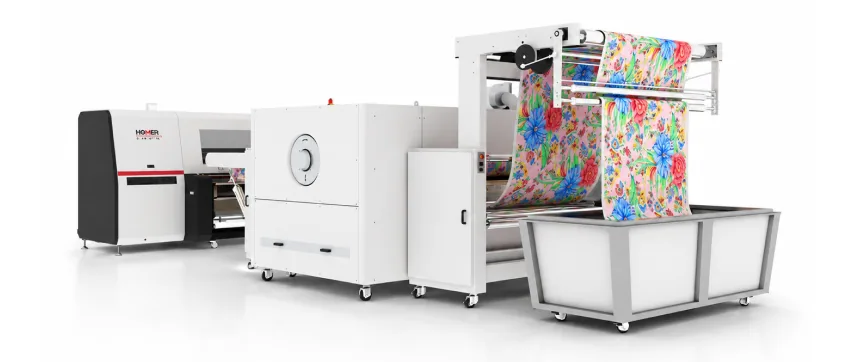
Key Specification
Advanced industrial textile printing technology designed to maximize productivity, ensure superior color accuracy, and support diverse fabric applications.
Print Heads
8 / 16 / 24× Kyocera Industrial (Single Channel)
Max Output
Up to 280 lm/hr
Max Resolution
1800 dpi
Ink Colors
8 (C + M + Y + K + O + R + B + G)
Standard Speed
Up to 185 lm/hr (16 heads)
Max Print Width
1900 mm
Ink Types
Reactive · Acid · Pigment · Disperse
Fabrics
All types incl. elastic and new fibre
Positioning
Built for businesses entering industrial textile printing, offering a balance of precision and cost-efficiency
Performance (24 Heads)
Up to 280 Lm/hr at 508×1200 dpi (2 pass); 250 Lm/hr at 600×1200 dpi (3 pass)
Performance (16 Heads)
Up to 185 Lm/hr at 508×1200 dpi (2 pass)
Evolution of Printing Capacity
Capable of printing up to 5,000 LM/day
On a digital textile printer running two or three shifts, the challenge isn’t printing one good metre. It’s printing the 5,000th metre exactly like the first.
K24 is built for that. Its symmetrical ink supply delivers the same ink flow to every colour channel, so no colour drifts ahead of the others. Real-time ink and air pressure monitoring catches supply problems before they show up as streaks or a stopped machine. Kyocera industrial printheads are designed for continuous duty, and de-wrinkle media handling keeps the fabric flat so image quality holds from the first roll to the last.
Challenge
How K24 Handles It
High-volume orders
24 heads, up to 280 lm/hr and 5,000 LM/day
Frequent design changes
Digital printing with no screens, so switching designs takes minutes
Difficult fabrics
De-wrinkle handling, with support for elastic and new-generation fibres
Colour drift over long runs
Symmetrical ink supply and real-time pressure monitoring
Growing capacity
Available with 8, 16 or 24 heads, so you can scale without replacing the machine
Good output starts with a good file. Before sending artwork to print:
Format: use TIFF or PSD for best quality. High-quality JPEG and PDF also work. Flatten layers before final output.
Resolution: 150–300 dpi at actual print size. Don’t upscale small images, because it makes the print look soft.
Size and repeat: set up files at the final print size, and check that all-over repeats join seamlessly.
Colour: embed the colour profile and supply Pantone or TCX references for brand colours, so the RIP can match them using K24’s 8-colour gamut.
Strike-off: always print a sample on the actual production fabric before running the full order.
Before installing K24, plan for these requirements:
Floor space: the machine, plus room for roll loading, the dryer, operator access and fabric storage
Power: a stable industrial supply with voltage stabilisation and backup
Environment: a controlled print room with stable temperature and humidity, and minimal dust
Fabric workflow: pretreatment before printing, and fixation afterwards (steaming and washing for reactive and acid inks, heat fixation for disperse, curing for pigment)
Maintenance access: clear space around the carriage and ink system for daily printhead care
Our team shares exact dimensions and power specifications during site planning.
Artwork preparation: the design is finalised, sized and colour-checked
RIP processing: RIP software applies the fabric’s colour profile, sets repeats and prepares the file for printing
Fabric loading: the pretreated roll is loaded, aligned and fed through the de-wrinkle system
Printing: K24 prints at the selected mode, from 2-pass for speed to 3-pass for detail
Monitoring: ink and air pressure are tracked in real time while the operator checks print quality
Finished-fabric handling: printed fabric is dried, rewound and sent for fixation and finishing
A 24 head digital textile printer uses 24 industrial printheads to print designs directly onto fabric. K24 uses 24 Kyocera heads with 8 ink colours, giving 3 heads per colour for faster printing without losing quality.
K24 prints up to 280 linear metres an hour in 2-pass mode and 250 lm/hr in 3-pass mode at 600×1200 dpi. Its daily capacity is up to 5,000 linear metres.
The 24-head K24 prints up to 280 lm/hr, against 185 lm/hr on the 16-head version, which is about 50% more output. K24 is also available with 8 heads, and you can scale up as production grows.
K24 prints on all fabric types, including elastic and new-generation fibres. It supports reactive, acid, pigment and disperse inks, covering cotton, silk, viscose, wool, nylon, polyester and blends.
Yes. Using disperse ink printed directly onto polyester, K24 gives sublimation-quality colour without transfer paper or a heat press.
K24 prints up to 1,900 mm wide.
The price depends on configuration, including head count, ink system and software. Contact our team for a quote based on your fabric range and production volume.
Talk to our team
Ready to unlock
Our specialists help you pick the right resolution, ink type, and configuration for your fabric range.
Call us directly
+91 74900 43336